Models
Nano Banana Remove Text from Image
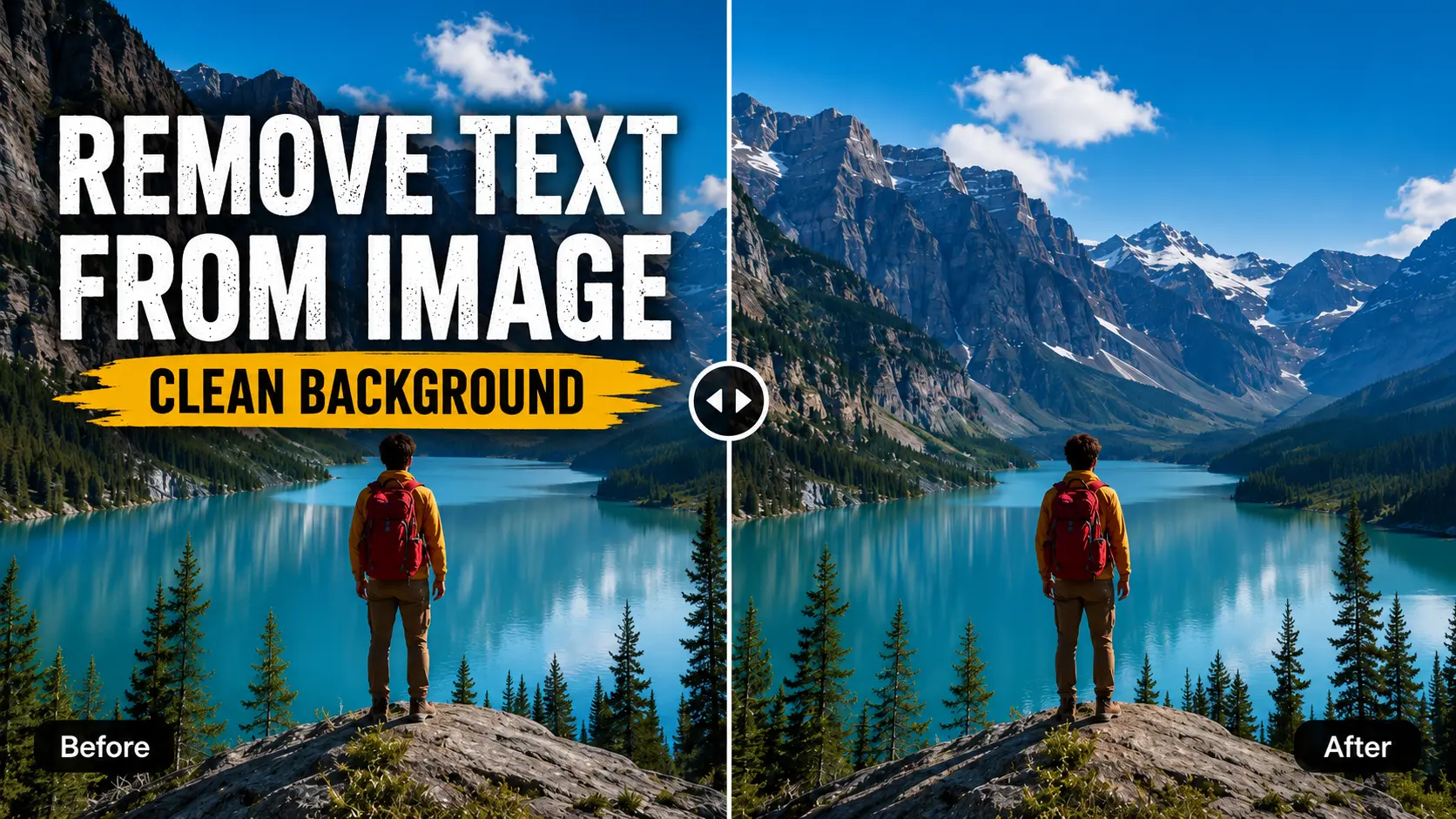
The fastest way to remove text from image online. Erase captions, labels, date stamps, and screenshot text in seconds. No editing skills needed.
Remove Text from Image
Upload Image
Drag and drop or click to upload your image
Supported formats: JPG, JPEG, PNG. Max file size 10MB.
Model
Output format
Standard defaults to PNG output. Choose High Quality to select JPEG, PNG, or WEBP.
Cleaned Image Result
Image text removal takes 1-3 min. Please don't close this tab while generating.
Features
Remove Text from Image - Key Features
Powerful cleanup, zero editing complexity
AI Text Detection
Scans uploaded files to find and remove text from image content: captions, labels, subtitles, date stamps, and UI copy. No mask drawing or prompts needed.
Natural Background Repair
After text is removed, the cleaned area blends back seamlessly by matching nearby texture, lighting, and color. The result looks natural, not patched.
JPEG, PNG, and WEBP
Download your cleaned image as JPEG for web delivery, PNG for transparent design use, or WEBP for faster page loads.
Fast Cleanup Workflow
Upload, pick a format, and click to remove text from image. Nano Banana handles detection, repair, and delivery automatically, no steps in between.
Image text removal workflow
Remove Text from Any Photo in 3 Steps
The simplest way to remove text from image online. Upload, pick your settings, and download a clean result.
Upload Your Image
Drop in any JPG, JPEG, or PNG to remove text from image. Works with photos, screenshots, product images, social graphics, and design files.
Choose Model and Format
Pick Standard for fast cleanup or Quality for finer detail. Select your output format: JPEG, PNG, or WEBP. No prompts or manual masking needed to remove text from image.
Remove Text from Image and Download
Click Remove Text from Image and Nano Banana detects the text, repairs the background, and delivers a clean result you can download, save to My Assets, or share instantly.
Upload Your Image
Drop in any JPG, JPEG, or PNG to remove text from image. Works with photos, screenshots, product images, social graphics, and design files.
Choose Model and Format
Pick Standard for fast cleanup or Quality for finer detail. Select your output format: JPEG, PNG, or WEBP. No prompts or manual masking needed to remove text from image.
Remove Text from Image and Download
Click Remove Text from Image and Nano Banana detects the text, repairs the background, and delivers a clean result you can download, save to My Assets, or share instantly.
Remove text from image in seconds
When to Use Remove Text from Image
Remove text from photo, screenshot, product image, or personal shot in one workflow
Product Photos
Remove text from image files: price tags, sale stickers, printed labels, and marketplace overlays. Get clean product shots without reshoot costs.
Social and Marketing Visuals
Reuse strong visuals by removing old captions or campaign copy. One clean image can work across multiple messages and layouts.
Screenshots and UI Images
Remove text from image or screenshot before sharing in presentations, tutorials, or documentation. Names, timestamps, and UI labels disappear cleanly.
Creator and Personal Photos
Clear date stamps, street signs, and distracting text while keeping the scene natural. The memory stays yours.
Real cleanup results from everyday workflows
Why creators trust Nano Banana to remove text from image
Designers, marketers, and creators use Nano Banana to remove text from image files, clean screenshots, erase labels, and rebuild natural-looking backgrounds without manual masking.
Elena Morris
Creative Director, E-commerce Studio
"We use Nano Banana to remove text from image assets before product launches. It cleans labels and old promo copy without making the background look patched."
Marcus Lee
Campaign Designer
"For social visuals, I can remove text from image posts and reuse the same creative across new campaigns in minutes."
Sofia Grant
Documentation Lead
"The best part is not drawing masks. I upload a screenshot, choose the format, and get a clean result for tutorials and decks."
David Kim
Content Operations Manager
"Date stamps and distracting captions used to slow down our photo cleanup. Nano Banana makes the edit fast enough for daily content work."
Everything you need to know to remove text from image files